
KidsConnect
KidsConnect
Scroll down to read
Scroll down to read
Scroll down to read
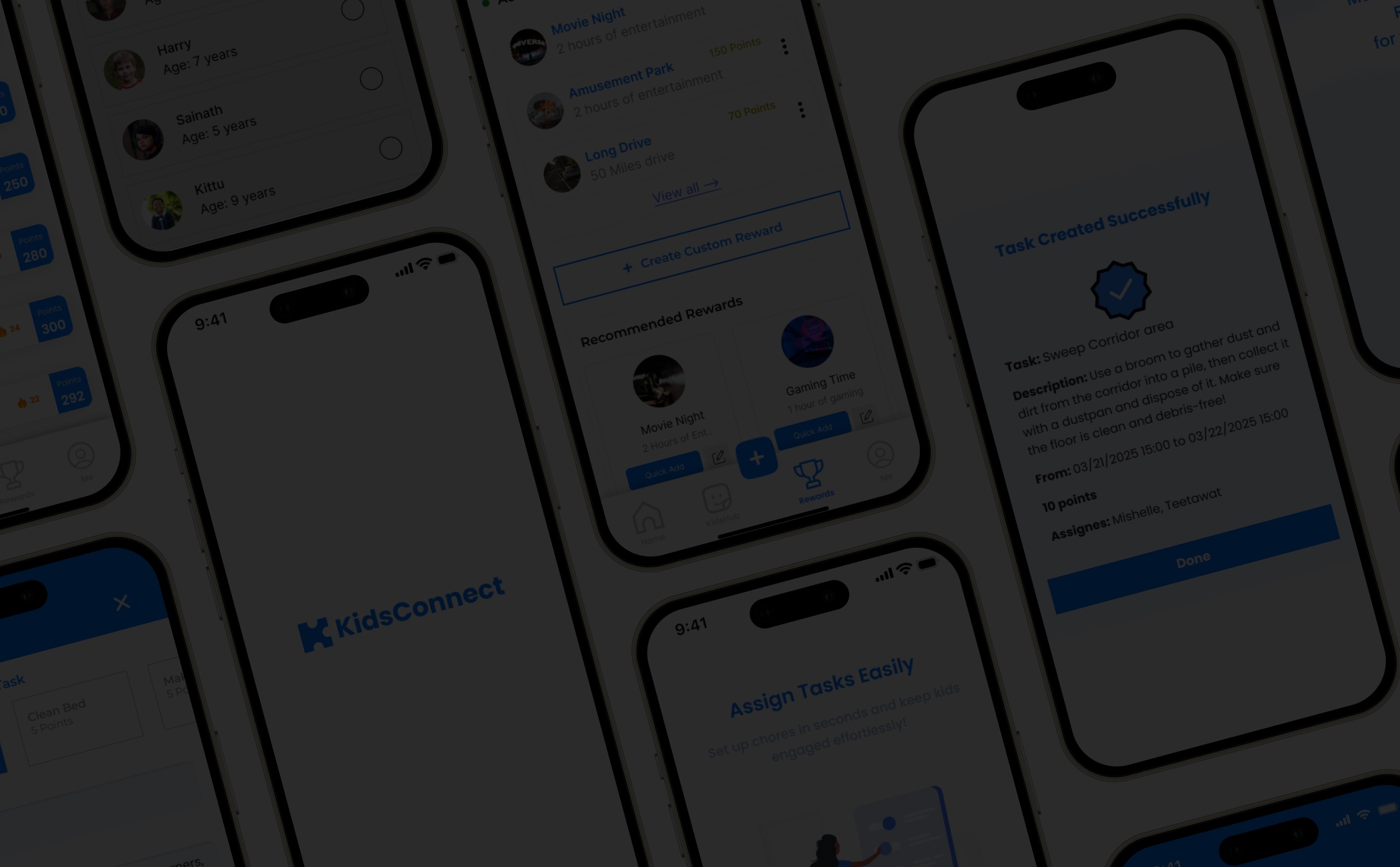
KidsConnect helps parents assign chores, track progress, and motivate children through a parent-controlled rewards and loyalty system where kids earn coins, badges, streaks, and redeemable rewards.
KidsConnect helps parents assign chores, track progress, and motivate children through a parent-controlled rewards and loyalty system where kids earn coins, badges, streaks, and redeemable rewards.
KidsConnect helps parents assign chores, track progress, and motivate children through a parent-controlled rewards and loyalty system where kids earn coins, badges, streaks, and redeemable rewards.
“How might we help parents manage household chores while motivating children to complete tasks consistently through rewards, streaks, badges, and parent-approved redemption?”
“How might we help parents manage household chores while motivating children to complete tasks consistently through rewards, streaks, badges, and parent-approved redemption?”
“How might we help parents manage household chores while motivating children to complete tasks consistently through rewards, streaks, badges, and parent-approved redemption?”
My role
My role
My role
UX Designer, Researcher
Conducted user interviews, surveys, and usability tests to gather actionable insights from caregivers.
Planned and analyzed findings, and iterated designs to enhance the user experience.
Maintained clear documentation and facilitated team communication to align on goals and deliver user-centered solutions.
UX Designer, Researcher
Conducted user interviews, surveys, and usability tests to gather actionable insights from caregivers.
Planned and analyzed findings, and iterated designs to enhance the user experience.
Maintained clear documentation and facilitated team communication to align on goals and deliver user-centered solutions.
UX Designer, Researcher
Conducted user interviews, surveys, and usability tests to gather actionable insights from caregivers.
Planned and analyzed findings, and iterated designs to enhance the user experience.
Maintained clear documentation and facilitated team communication to align on goals and deliver user-centered solutions.
Duration: 11 Weeks
Duration: 11 Weeks
Duration: 11 Weeks
Project Background
Project Background
Project Background
Families today use a variety of methods to stay organized and maintain daily routines, especially when managing responsibilities across multiple age groups. As digital tools increasingly become part of everyday life, there is an opportunity to explore how thoughtful design can enhance collaboration, communication, and engagement within the home environment.
Families today use a variety of methods to stay organized and maintain daily routines, especially when managing responsibilities across multiple age groups. As digital tools increasingly become part of everyday life, there is an opportunity to explore how thoughtful design can enhance collaboration, communication, and engagement within the home environment.
Families today use a variety of methods to stay organized and maintain daily routines, especially when managing responsibilities across multiple age groups. As digital tools increasingly become part of everyday life, there is an opportunity to explore how thoughtful design can enhance collaboration, communication, and engagement within the home environment.
This project explores the development of a digital solution intended to support shared responsibilities in family settings. Through user-centered design practices, the focus was placed on understanding real-life routines, identifying areas for improvement, and creating a system that complements diverse parenting styles and household dynamics.
This project explores the development of a digital solution intended to support shared responsibilities in family settings. Through user-centered design practices, the focus was placed on understanding real-life routines, identifying areas for improvement, and creating a system that complements diverse parenting styles and household dynamics.
This project explores the development of a digital solution intended to support shared responsibilities in family settings. Through user-centered design practices, the focus was placed on understanding real-life routines, identifying areas for improvement, and creating a system that complements diverse parenting styles and household dynamics.
Problem
Problem
Problem
There is a clear gap in the digital space for a simple app that helps families stay organized and keeps children involved in everyday tasks. Without the right tools, it becomes harder for families to build healthy routines and share responsibilities.
There is a clear gap in the digital space for a simple app that helps families stay organized and keeps children involved in everyday tasks. Without the right tools, it becomes harder for families to build healthy routines and share responsibilities.
There is a clear gap in the digital space for a simple app that helps families stay organized and keeps children involved in everyday tasks. Without the right tools, it becomes harder for families to build healthy routines and share responsibilities.
1: No All-in-One Solution
Parents juggle multiple ways for tasks, tracking, and rewards or stop using them altogether.
2: Overcomplicated or Money-Focused
Most apps rely on cash rewards or are too complex for daily family use.
3: Lack of Customization
Current tools don’t adapt to different parenting styles, age groups, or routines.
4: Low Engagement for Kids
Apps lack fun and gamification, making them less motivating for children.
5: Weak reward follow-through
Bad follow-through for task completion, quality approval, coins, badges, and reward redemption.
1: No All-in-One Solution
1: No All-in-One Solution
Parents juggle multiple ways for tasks, tracking, and rewards or stop using them altogether.
2: Overcomplicated or Money-Focused
2: Overcomplicated or Money-Focused
Most apps rely on cash rewards or are too complex for daily family use.
3: Lack of Customization
3: Lack of Customization
Current tools don’t adapt to different parenting styles, age groups, or routines.
4: Low Engagement for Kids
4: Low Engagement for Kids
Apps lack fun and gamification, making them less motivating for children.
5: Weak reward follow-through
5: Weak reward follow-through
Bad follow-through for task completion, quality approval, coins, badges, and reward redemption.
Research: Competitive & SWOT Analyses
Research: Competitive & SWOT Analyses
Research: Competitive & SWOT Analyses
To better understand the landscape of chore and family management applications, we conducted a competitive and SWOT analysis. I reviewed apps like Greenlight and BusyKid to understand how families currently manage tasks/finances and to identify gaps KidsConnect could address. Both apps are well-established in the child finance and task management space, but they present key limitations.
To better understand the landscape of chore and family management applications, we conducted a competitive and SWOT analysis. I reviewed apps like Greenlight and BusyKid to understand how families currently manage tasks/finances and to identify gaps KidsConnect could address. Both apps are well-established in the child finance and task management space, but they present key limitations.
To better understand the landscape of chore and family management applications, we conducted a competitive and SWOT analysis. I reviewed apps like Greenlight and BusyKid to understand how families currently manage tasks/finances and to identify gaps KidsConnect could address. Both apps are well-established in the child finance and task management space, but they present key limitations.


BusyKid
BusyKid
BusyKid
Strong chore-to-money connection. Less focus on non-monetary rewards, family routines, and fun motivation
Strong chore-to-money connection. Less focus on non-monetary rewards, family routines, and fun motivation
Strong chore-to-money connection. Less focus on non-monetary rewards, family routines, and fun motivation
Greenlight
Greenlight
Greenlight
Strong financial learning and parental controls. Can feel too finance-heavy for younger children
Strong financial learning and parental controls. Can feel too finance-heavy for younger children
Strong financial learning and parental controls. Can feel too finance-heavy for younger children
KidsConnect
KidsConnect
KidsConnect
Parent-controlled chores, coins, badges, streaks, and flexible rewards. Focuses on motivation, family engagement, and habit-building instead of only money
Parent-controlled chores, coins, badges, streaks, and flexible rewards. Focuses on motivation, family engagement, and habit-building instead of only money
Parent-controlled chores, coins, badges, streaks, and flexible rewards. Focuses on motivation, family engagement, and habit-building instead of only money
User Reasearch
User Reasearch
User Reasearch
To understand how families manage daily chores and task routines, I conducted surveys, interviews, and user testing with parents and caregivers. The goal was to uncover common pain points and identify tools that would make chore management easier. I also gathered child behavior insights through parent observations, which helped me with motivation styles.
To understand how families manage daily chores and task routines, I conducted surveys, interviews, and user testing with parents and caregivers. The goal was to uncover common pain points and identify tools that would make chore management easier. I also gathered child behavior insights through parent observations, which helped me with motivation styles.
To understand how families manage daily chores and task routines, I conducted surveys, interviews, and user testing with parents and caregivers. The goal was to uncover common pain points and identify tools that would make chore management easier. I also gathered child behavior insights through parent observations, which helped me with motivation styles.
Insights gathered through direct feedback and virtual conversations revealed key needs, such as simple task setup, customizable non-financial rewards, and a clear, user-friendly interface.
Insights gathered through direct feedback and virtual conversations revealed key needs, such as simple task setup, customizable non-financial rewards, and a clear, user-friendly interface.
Insights gathered through direct feedback and virtual conversations revealed key needs, such as simple task setup, customizable non-financial rewards, and a clear, user-friendly interface.
But a key opportunity emerged around motivation after task assignment. Parents did not only need a way to create chores; they needed a system that helped children stay engaging after the first few days. This led to the loyalty layer: coins, streaks, badges, approval-based rewards, and progress visibility.
But a key opportunity emerged around motivation after task assignment. Parents did not only need a way to create chores; they needed a system that helped children stay engaging after the first few days. This led to the loyalty layer: coins, streaks, badges, approval-based rewards, and progress visibility.
But a key opportunity emerged around motivation after task assignment. Parents did not only need a way to create chores; they needed a system that helped children stay engaging after the first few days. This led to the loyalty layer: coins, streaks, badges, approval-based rewards, and progress visibility.
User Survey Takeaways
User Survey Takeaways
User Survey Takeaways
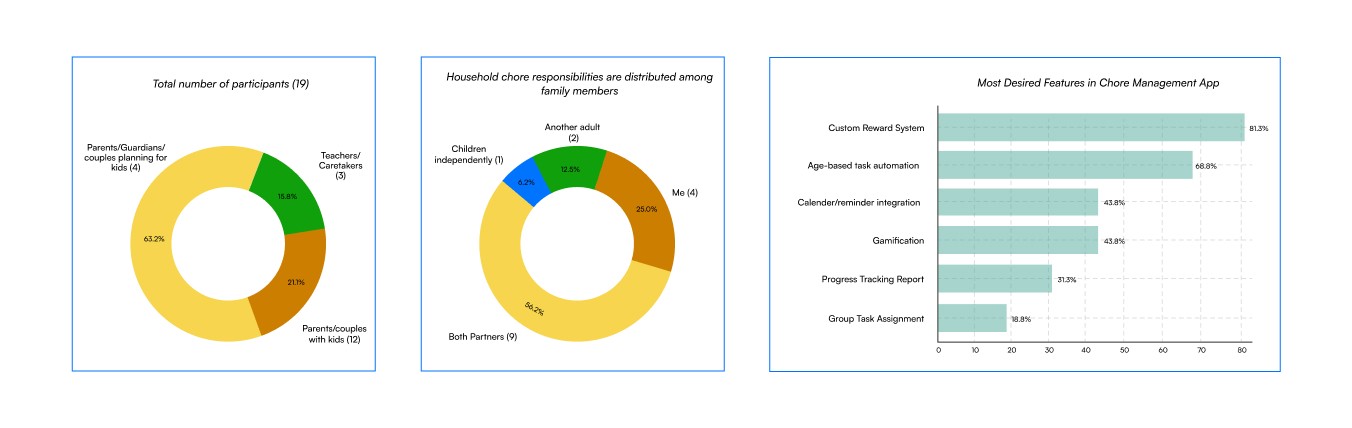
To guide the KidsConnect design, a survey of 19 participants including parents, couples, and childcare providers revealed that 56.3% still rely on verbal chore assignments with minimal use of digital tools. Data was collected through Google Forms and FigJam, combining quantitative and qualitative insights.
To guide the KidsConnect design, a survey of 19 participants including parents, couples, and childcare providers revealed that 56.3% still rely on verbal chore assignments with minimal use of digital tools. Data was collected through Google Forms and FigJam, combining quantitative and qualitative insights.
Most parents preferred non-financial rewards like screen time and outings, highlighting the need for customizable incentives. Key challenges included tracking tasks, sustaining motivation, and balancing responsibilities. Participants showed strong interest in age-based automation, gamification, calendar integration, and progress tracking, shaping the app’s focus on ease of use and family-friendly design.
Most parents preferred non-financial rewards like screen time and outings, highlighting the need for customizable incentives. Key challenges included tracking tasks, sustaining motivation, and balancing responsibilities. Participants showed strong interest in age-based automation, gamification, calendar integration, and progress tracking, shaping the app’s focus on ease of use and family-friendly design.
User Interview Takeaway
User Interview Takeaway
User Interview Takeaway
Interviews with six participants including parents, couples, and teachers revealed that most relied on verbal reminders or physical lists, with minimal use of digital tools. Key challenges included time constraints and inconsistent task management.
Interviews with six participants including parents, couples, and teachers revealed that most relied on verbal reminders or physical lists, with minimal use of digital tools. Key challenges included time constraints and inconsistent task management.
Interviews with six participants including parents, couples, and teachers revealed that most relied on verbal reminders or physical lists, with minimal use of digital tools. Key challenges included time constraints and inconsistent task management.
Participants emphasized the need for a simple, easy-to-use app with features like shared calendars, task reminders, gamification, voice-to-text, and affordability. These insights shaped the core design priorities for KidsConnect.
Participants emphasized the need for a simple, easy-to-use app with features like shared calendars, task reminders, gamification, voice-to-text, and affordability. These insights shaped the core design priorities for KidsConnect.
Participants emphasized the need for a simple, easy-to-use app with features like shared calendars, task reminders, gamification, voice-to-text, and affordability. These insights shaped the core design priorities for KidsConnect.
72%
72%
72%
Parents struggle to keep kids motivated
Parents struggle to keep kids motivated
Parents struggle to keep kids motivated
65%
65%
65%
Families juggle try different methods for chores & rewards
Families juggle try different methods for chores & rewards
Families juggle try different methods for chores & rewards
6 hrs/week
6 hrs/week
6 hrs/week
Time parents spend managing tasks
Time parents spend managing tasks
Time parents spend managing tasks
58%
58%
58%
Kids lose interest in chores
Kids lose interest in chores
Kids lose interest in chores
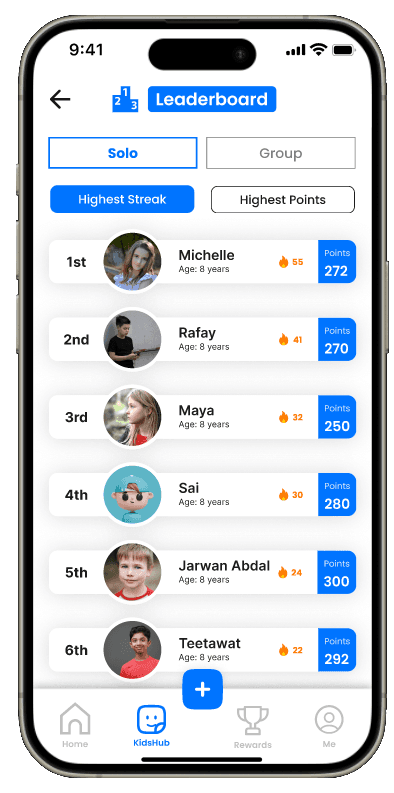
Since 72% of parents struggled with motivation and 58% said kids lose interest in chores, I introduced a loyalty loop that rewards consistency, not just one-time completion. Kids earn coins for approved chores, unlock badges at milestones, maintain streaks, and redeem rewards selected by parents.
Since 72% of parents struggled with motivation and 58% said kids lose interest in chores, I introduced a loyalty loop that rewards consistency, not just one-time completion. Kids earn coins for approved chores, unlock badges at milestones, maintain streaks, and redeem rewards selected by parents.
Since 72% of parents struggled with motivation and 58% said kids lose interest in chores, I introduced a loyalty loop that rewards consistency, not just one-time completion. Kids earn coins for approved chores, unlock badges at milestones, maintain streaks, and redeem rewards selected by parents.
Card Sorts & Affinity Mapping
Card Sorts & Affinity Mapping
Card Sorts & Affinity Mapping
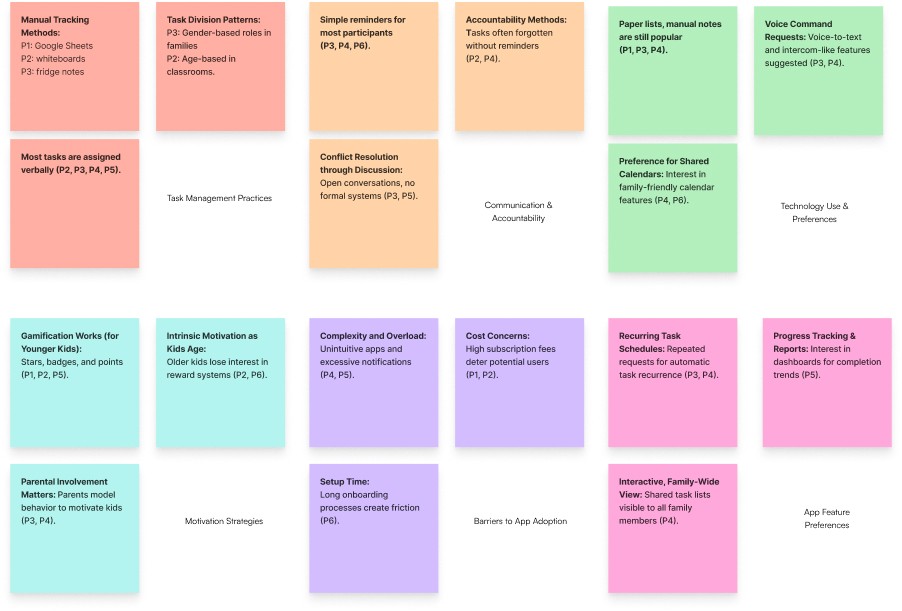
After collecting results, the next phase used card sorting and affinity mapping to understand how users approach chore management. This hands-on stage revealed user behaviors, expectations, and frustrations, surfacing key themes from survey and interview responses.
After collecting results, the next phase used card sorting and affinity mapping to understand how users approach chore management. This hands-on stage revealed user behaviors, expectations, and frustrations, surfacing key themes from survey and interview responses.
After collecting results, the next phase used card sorting and affinity mapping to understand how users approach chore management. This hands-on stage revealed user behaviors, expectations, and frustrations, surfacing key themes from survey and interview responses.
The process organized tasks, features, ideas, pain points, and user preferences into clear categories, enabling a more intuitive, family-centered app structure. It also highlighted emotional and practical routines families follow in assigning tasks and motivating children, guiding a design that is empathetic and easy to use.
The process organized tasks, features, ideas, pain points, and user preferences into clear categories, enabling a more intuitive, family-centered app structure. It also highlighted emotional and practical routines families follow in assigning tasks and motivating children, guiding a design that is empathetic and easy to use.
The process organized tasks, features, ideas, pain points, and user preferences into clear categories, enabling a more intuitive, family-centered app structure. It also highlighted emotional and practical routines families follow in assigning tasks and motivating children, guiding a design that is empathetic and easy to use.
User: Personas, Task Flows, Journeys
User: Personas, Task Flows, Journeys
User: Personas, Task Flows, Journeys
Before the KidsConnect design phase, research expanded into spaces where parents, guardians, and educators share experiences, including parenting forums, digital education communities, and informal peer groups.
Before the KidsConnect design phase, research expanded into spaces where parents, guardians, and educators share experiences, including parenting forums, digital education communities, and informal peer groups.
Before the KidsConnect design phase, research expanded into spaces where parents, guardians, and educators share experiences, including parenting forums, digital education communities, and informal peer groups.
By analyzing these conversations alongside survey and interview insights, a clearer picture emerged of real-world challenges in chore management. This user-centered approach led to personas representing various household dynamics and caregiver roles, which became the foundation for user journeys and task flows aligned with everyday routines, motivations, and constraints.
By analyzing these conversations alongside survey and interview insights, a clearer picture emerged of real-world challenges in chore management. This user-centered approach led to personas representing various household dynamics and caregiver roles, which became the foundation for user journeys and task flows aligned with everyday routines, motivations, and constraints.
By analyzing these conversations alongside survey and interview insights, a clearer picture emerged of real-world challenges in chore management. This user-centered approach led to personas representing various household dynamics and caregiver roles, which became the foundation for user journeys and task flows aligned with everyday routines, motivations, and constraints.
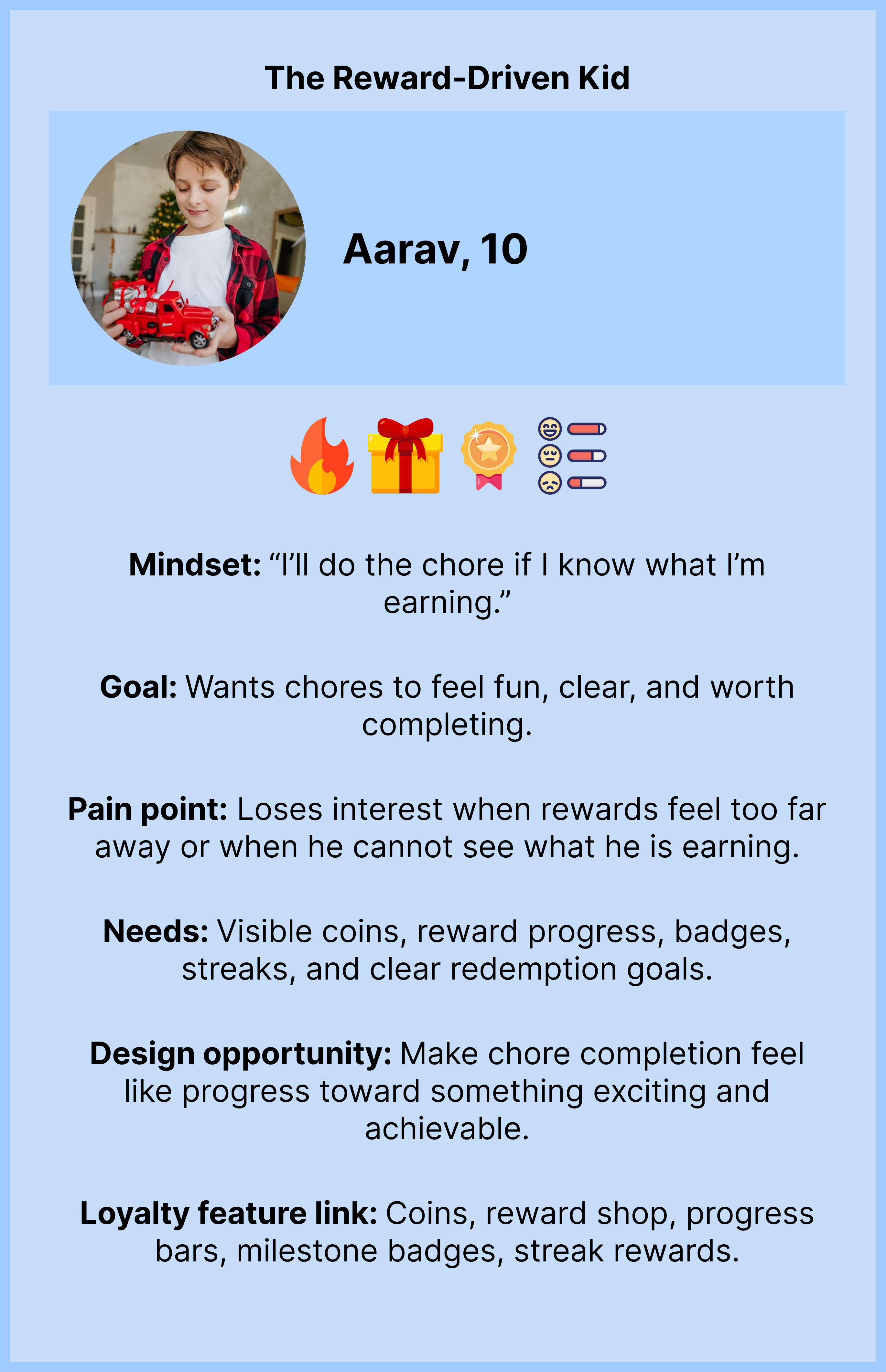
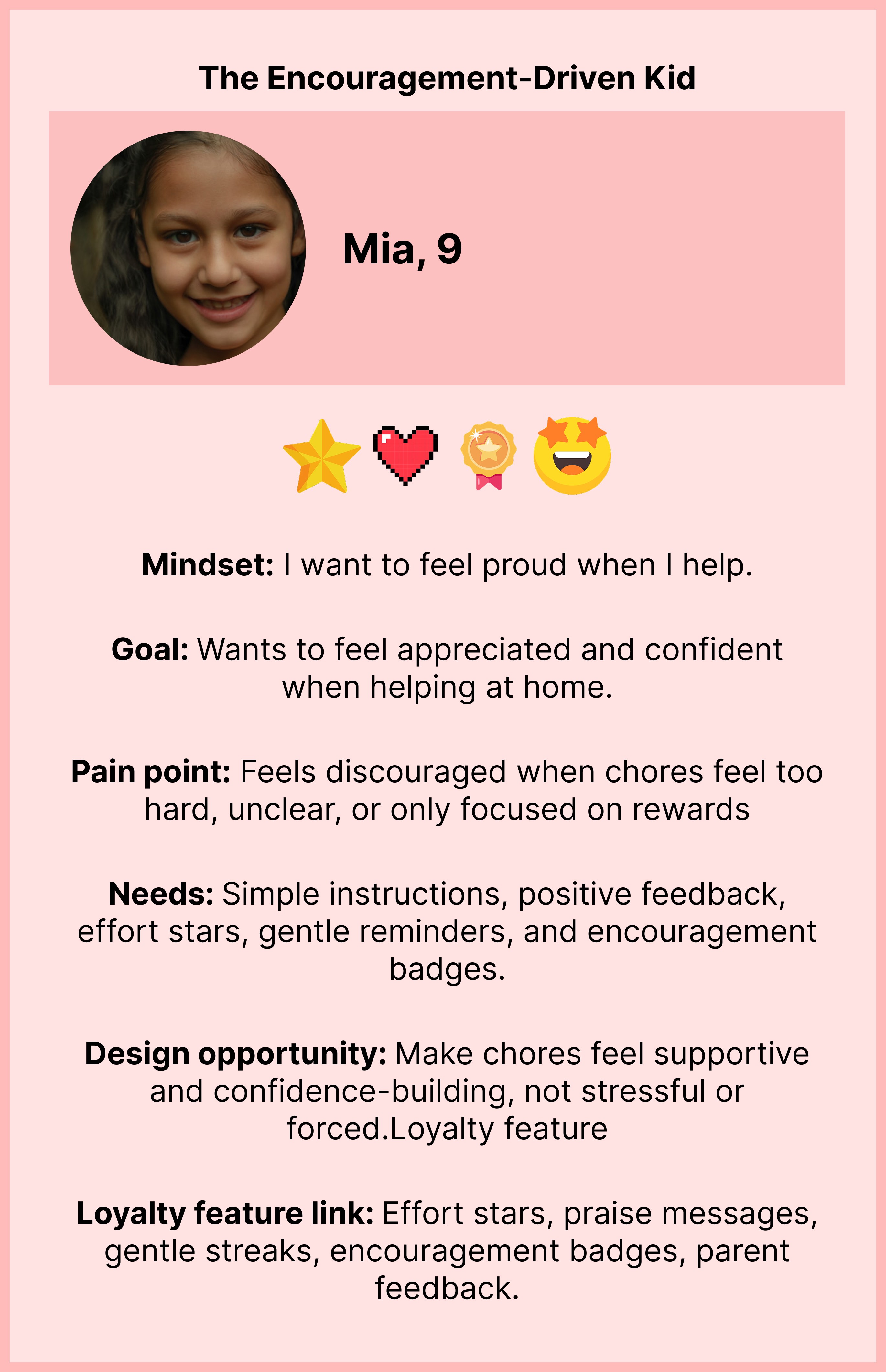
The insights I gathered during my research helped me develop 5 personas (Parents & children):
The insights I gathered during my research helped me develop 5 personas (Parents & children):
The insights I gathered during my research helped me develop 5 personas (Parents & children):
Jordan & Sam Patel: "The Coordinated Couple"
Emily Carter: "Full-time working mom"
James Anderson: "The Organized Teacher"
Jordan & Sam Patel: "The Coordinated Couple"
Emily Carter: "Full-time working mom"
James Anderson: "The Organized Teacher"
Jordan & Sam Patel: "The Coordinated Couple"
Emily Carter: "Full-time working mom"
James Anderson: "The Organized Teacher"

Product Strategy
Product Strategy
Product Strategy
Identified four core product strategies to connect parent needs, child motivation, and business goals before moving into loyalty flows, wireframes, and testing
Identified four core product strategies to connect parent needs, child motivation, and business goals before moving into loyalty flows, wireframes, and testing
Identified four core product strategies to connect parent needs, child motivation, and business goals before moving into loyalty flows, wireframes, and testing
Faster Chore Setup
Product goal
Help parents assign chores faster.
User value
Parents spend less time reminding, explaining, and manually tracking chores.
Business value
A smoother setup experience increases the chances of parents continuing with the app and upgrading from the free plan.
Loyalty-Based Motivation
Product goal
Motivate kids through coins, badges, streaks, and rewards.
User value
Kids can see progress, understand what they are earning, and stay more engaged with daily chores.
Business value
Higher child engagement can improve family retention and make paid plans feel more valuable.
Parent-Controlled Rewards
Product goal
Allow parents to control which rewards children can see and redeem.
User value
Parents stay in control of rewards, spending, and approval before coins or items are redeemed.
Business value
This builds trust and supports reward shop purchases inside the app.
Automation and AI Planning
Product goal
Help parents schedule chores, automate routines, and use AI for weekly chore planning.
User value
Parents save time by creating repeatable chore routines and getting smart reward suggestions.
Business value
Advanced automation and AI features justify Plus, Family Pro, and Pro Plus subscriptions.
Faster Chore Setup
Product goal
Help parents assign chores faster.
User value
Parents spend less time reminding, explaining, and manually tracking chores.
Business value
A smoother setup experience increases the chances of parents continuing with the app and upgrading from the free plan.
Loyalty-Based Motivation
Product goal
Motivate kids through coins, badges, streaks, and rewards.
User value
Kids can see progress, understand what they are earning, and stay more engaged with daily chores.
Business value
Higher child engagement can improve family retention and make paid plans feel more valuable.
Parent-Controlled Rewards
Product goal
Allow parents to control which rewards children can see and redeem.
User value
Parents stay in control of rewards, spending, and approval before coins or items are redeemed.
Business value
This builds trust and supports reward shop purchases inside the app.
Automation and AI Planning
Product goal
Help parents schedule chores, automate routines, and use AI for weekly chore planning.
User value
Parents save time by creating repeatable chore routines and getting smart reward suggestions.
Business value
Advanced automation and AI features justify Plus, Family Pro, and Pro Plus subscriptions.
Faster Chore Setup
Product goal
Help parents assign chores faster.
User value
Parents spend less time reminding, explaining, and manually tracking chores.
Business value
A smoother setup experience increases the chances of parents continuing with the app and upgrading from the free plan.
Loyalty-Based Motivation
Product goal
Motivate kids through coins, badges, streaks, and rewards.
User value
Kids can see progress, understand what they are earning, and stay more engaged with daily chores.
Business value
Higher child engagement can improve family retention and make paid plans feel more valuable.
Parent-Controlled Rewards
Product goal
Allow parents to control which rewards children can see and redeem.
User value
Parents stay in control of rewards, spending, and approval before coins or items are redeemed.
Business value
This builds trust and supports reward shop purchases inside the app.
Automation and AI Planning
Product goal
Help parents schedule chores, automate routines, and use AI for weekly chore planning.
User value
Parents save time by creating repeatable chore routines and getting smart reward suggestions.
Business value
Advanced automation and AI features justify Plus, Family Pro, and Pro Plus subscriptions.

Loyalty Flow Strategy
Loyalty Flow Strategy
Loyalty Flow Strategy

The loyalty system was designed to create a simple habit loop:
The loyalty system was designed to create a simple habit loop:
The loyalty system was designed to create a simple habit loop:

STEPS


Parent action


Child experience

Design Thinking
Assign Chore
Parent sets chore, difficulty, deadline, and coins → Child sees task, due date, and reward value → Kids get clarity, while parents control effort and rewards.
Complete Chore
Parent chooses photo proof or simple completion → Child marks chore complete and uploads proof if needed → Proof reduces parent doubt and builds child accountability.
Approve Work
Parent reviews chore and rates effort/quality → Child earns coins after approval with feedback → Rewards feel earned, not automatic.
Build Habit
Parent tracks daily, weekly, and monthly consistency → Child builds streaks, unlocks badges, and sees milestone progress → The loyalty system rewards consistency, not just one-time completion.
Redeem Reward
Parent controls visible, available, or hidden rewards → Child redeems parent-approved rewards with earned coins → Kids feel ownership while parents control spending and access.
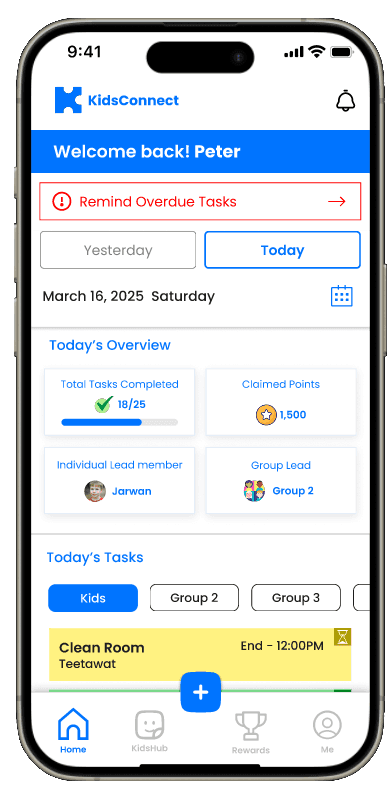
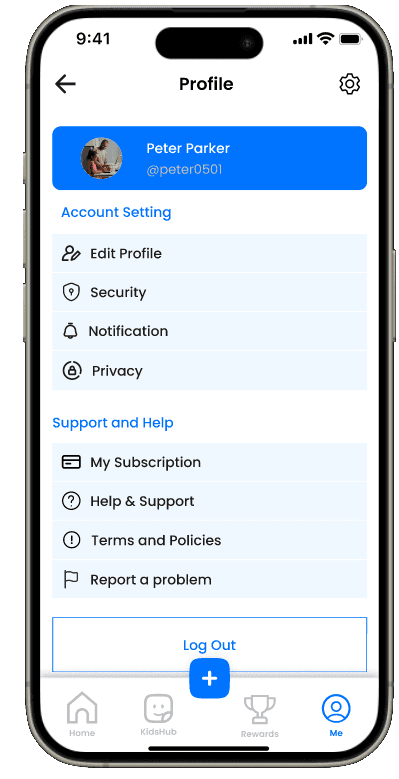
In designing KidsConnect, the focus was on a feature where parents can view, assign, and track tasks. Each task has clear details, optional reminders, and customizable rewards to engage children. The interface uses familiar, intuitive patterns to keep the experience simple and accessible.
In designing KidsConnect, the focus was on a feature where parents can view, assign, and track tasks. Each task has clear details, optional reminders, and customizable rewards to engage children. The interface uses familiar, intuitive patterns to keep the experience simple and accessible.
In designing KidsConnect, the focus was on a feature where parents can view, assign, and track tasks. Each task has clear details, optional reminders, and customizable rewards to engage children. The interface uses familiar, intuitive patterns to keep the experience simple and accessible.
Exploration, Ideation: Low-fidelity Wireframes
Exploration, Ideation: Low-fidelity Wireframes
Exploration, Ideation: Low-fidelity Wireframes
In the exploration and ideation phase, I focused on core functionalities addressing user persona needs: task visibility, task tracking, child motivation (rewards), and ease of use for parents and teachers.
In the exploration and ideation phase, I focused on core functionalities addressing user persona needs: task visibility, task tracking, child motivation (rewards), and ease of use for parents and teachers.
In the exploration and ideation phase, I focused on core functionalities addressing user persona needs: task visibility, task tracking, child motivation (rewards), and ease of use for parents and teachers.
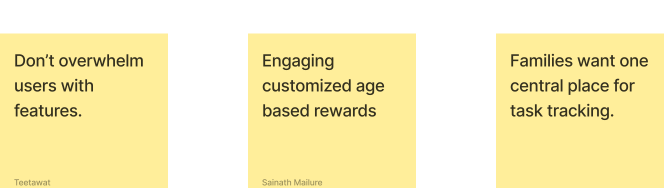
User journeys were mapped to show how a parent assigns chores, how a child views and completes them, and how progress is tracked and rewarded. Core features include a shared family dashboard, customizable rewards, progress tracking, and age-based task suggestions.
User journeys were mapped to show how a parent assigns chores, how a child views and completes them, and how progress is tracked and rewarded. Core features include a shared family dashboard, customizable rewards, progress tracking, and age-based task suggestions.
User journeys were mapped to show how a parent assigns chores, how a child views and completes them, and how progress is tracked and rewarded. Core features include a shared family dashboard, customizable rewards, progress tracking, and age-based task suggestions.
Based on these needs, early sketches were refined into initial wireframes, forming the foundation for a simple, engaging, and adaptable chore management app for families.
Based on these needs, early sketches were refined into initial wireframes, forming the foundation for a simple, engaging, and adaptable chore management app for families.
Based on these needs, early sketches were refined into initial wireframes, forming the foundation for a simple, engaging, and adaptable chore management app for families.
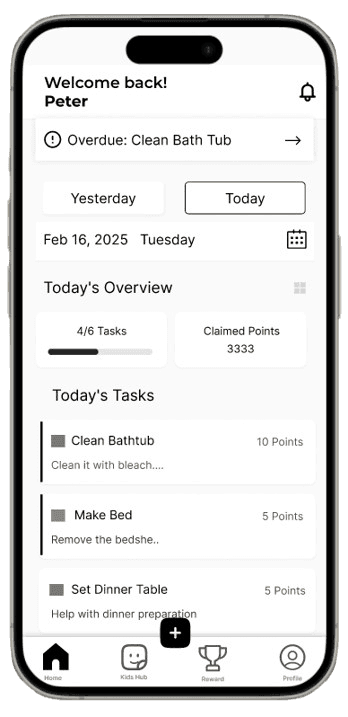

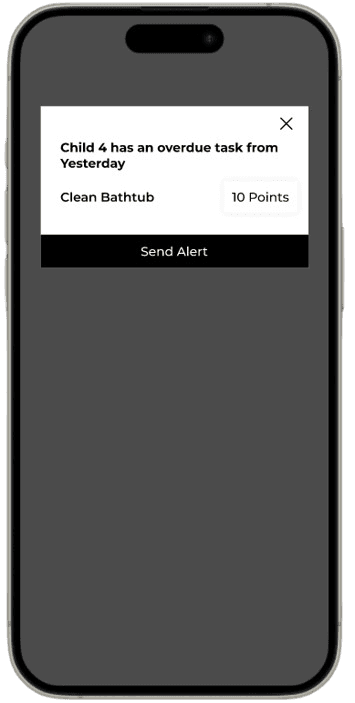
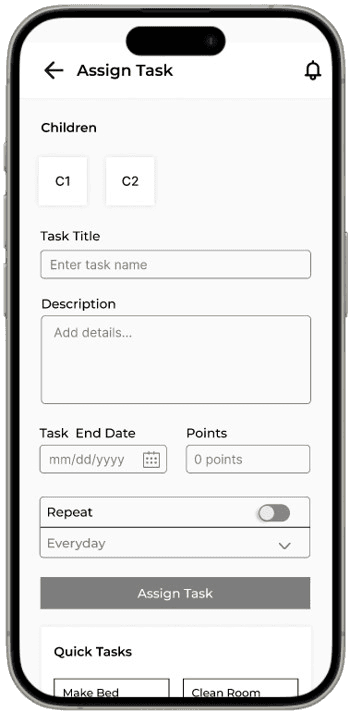

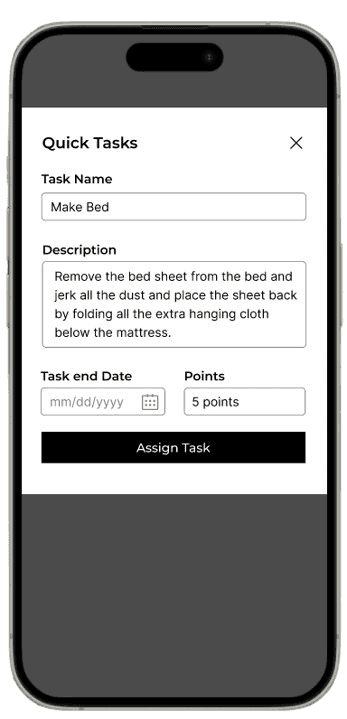

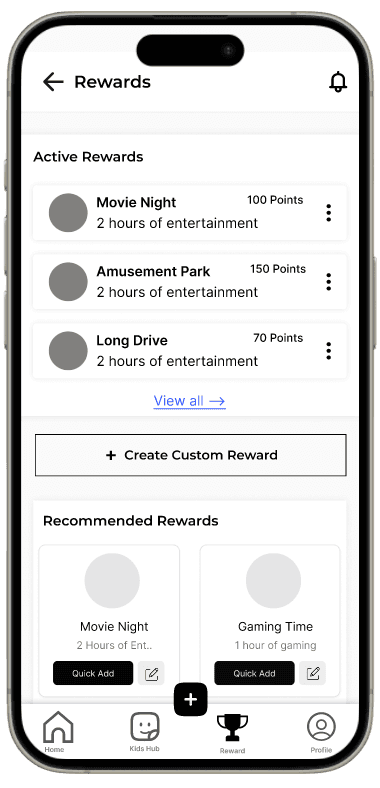
In designing KidsConnect, the focus was on a feature where parents can view, assign, and track tasks. Each task has clear details, optional reminders, and customizable rewards to engage children. The interface uses familiar, intuitive patterns to keep the experience simple and accessible.
In designing KidsConnect, the focus was on a feature where parents can view, assign, and track tasks. Each task has clear details, optional reminders, and customizable rewards to engage children. The interface uses familiar, intuitive patterns to keep the experience simple and accessible.
In designing KidsConnect, the focus was on a feature where parents can view, assign, and track tasks. Each task has clear details, optional reminders, and customizable rewards to engage children. The interface uses familiar, intuitive patterns to keep the experience simple and accessible.
User testing
User testing
User testing
I conducted a low-fidelity prototype usability test using Maze to evaluate the app’s early design and concept. Participants recorded their screens and thought aloud while completing tasks, then completed a post-test questionnaire with three opinion-scale questions rated 1 (strongly disagree) to 7 (strongly agree).
I conducted a low-fidelity prototype usability test using Maze to evaluate the app’s early design and concept. Participants recorded their screens and thought aloud while completing tasks, then completed a post-test questionnaire with three opinion-scale questions rated 1 (strongly disagree) to 7 (strongly agree).
I conducted a low-fidelity prototype usability test using Maze to evaluate the app’s early design and concept. Participants recorded their screens and thought aloud while completing tasks, then completed a post-test questionnaire with three opinion-scale questions rated 1 (strongly disagree) to 7 (strongly agree).
The test included four key tasks, each with a guiding scenario. These tasks were designed to reveal issues or gaps in the initial design and identify areas for early improvement.
The test included four key tasks, each with a guiding scenario. These tasks were designed to reveal issues or gaps in the initial design and identify areas for early improvement.
The test included four key tasks, each with a guiding scenario. These tasks were designed to reveal issues or gaps in the initial design and identify areas for early improvement.
Task 1: Assign a specific chore to a child..
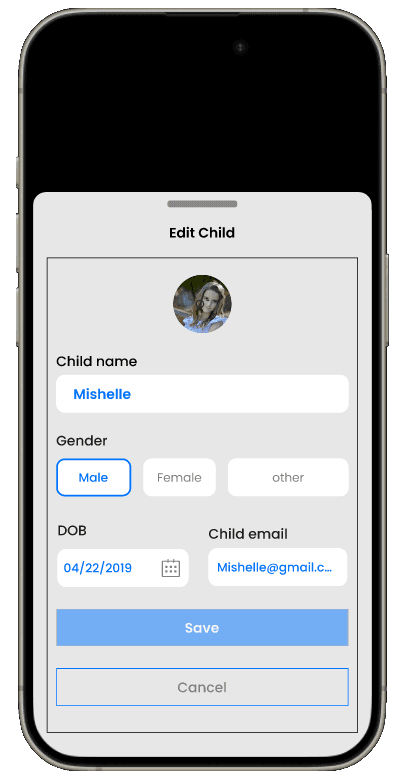
Task 2: Add a new child profile and remove an existing one.
Task 3: Create a custom reward that can be linked to task completion.
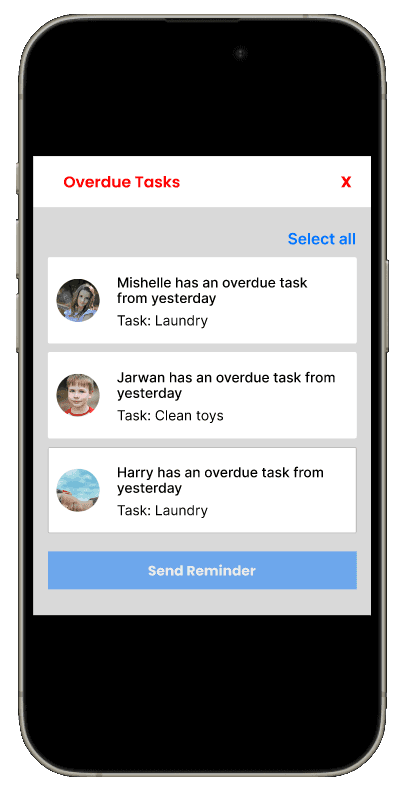
Task 4: Send an alert for a task that is overdue.
Task 1: Assign a specific chore to a child..
Task 2: Add a new child profile and remove an existing one.
Task 3: Create a custom reward that can be linked to task completion.
Task 4: Send an alert for a task that is overdue.
Task 1: Assign a specific chore to a child..
Task 2: Add a new child profile and remove an existing one.
Task 3: Create a custom reward that can be linked to task completion.
Task 4: Send an alert for a task that is overdue.
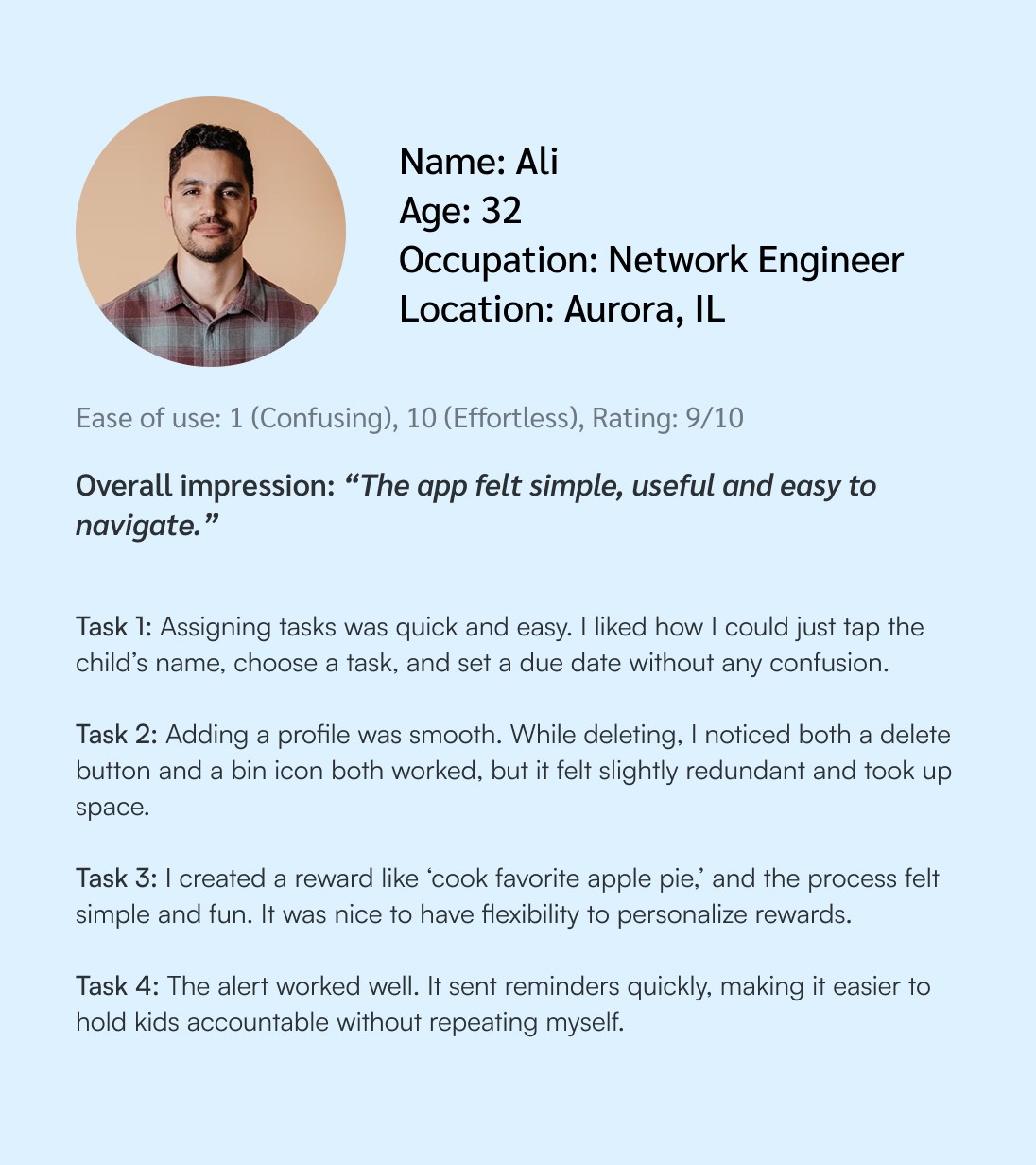
This approach helped me gather valuable insights on the app’s prototype interface and functionality directly from the target audience, allowing me to identify and address usability issues early in the design process.
This approach helped me gather valuable insights on the app’s prototype interface and functionality directly from the target audience, allowing me to identify and address usability issues early in the design process.
Users asked for the manual calender to switch between days
Users asked for the manual calender to switch between days
Users asked for the manual calender to switch between days
Users requested an “alert child to complete chore” button.
Users requested an “alert child to complete chore” button.
Users requested an “alert child to complete chore” button.
Confusion while adding a child
Confusion while adding a child
Confusion while adding a child
Hi-Fidelity
Hi-Fidelity
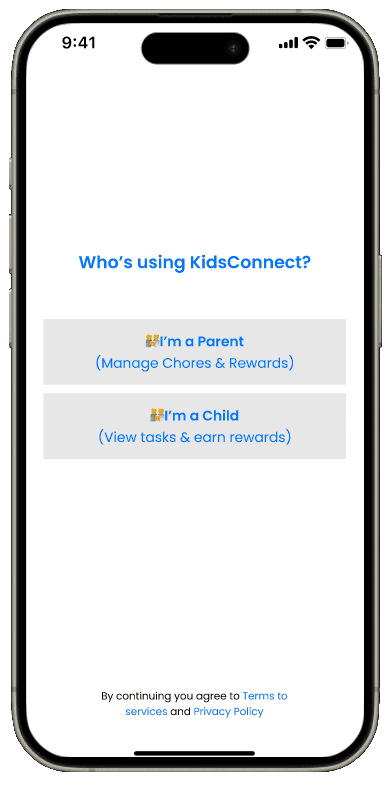
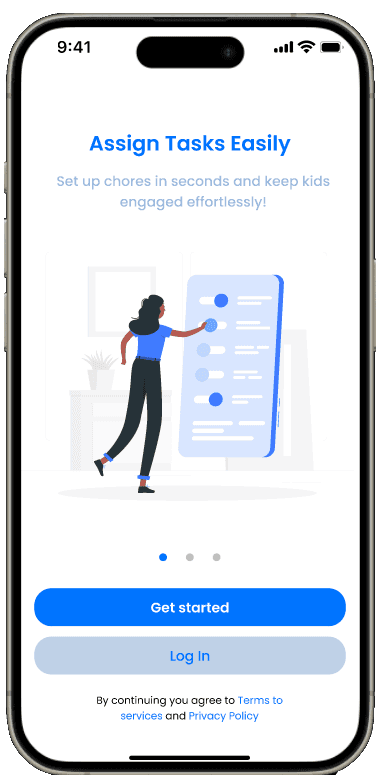
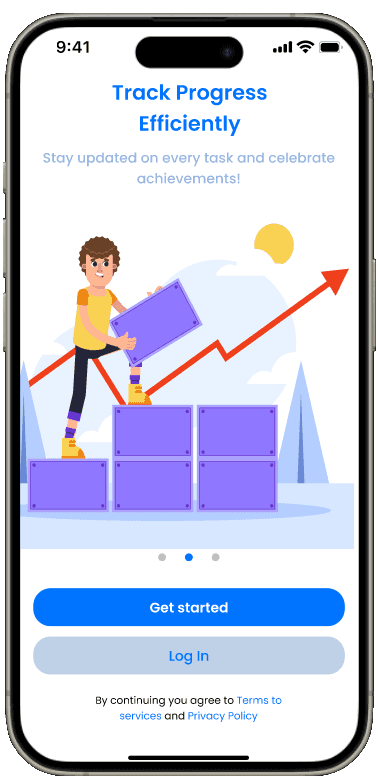
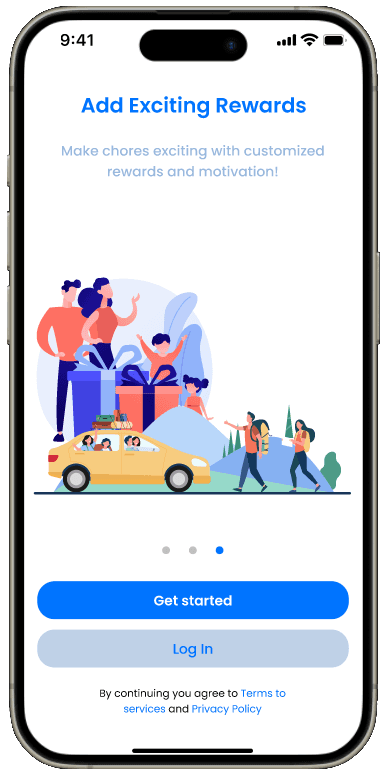




90%
Task success rate (parents assign tasks easily)
40% faster
Time saved assigning tasks vs. other apps
SUS 82
Users found KidsConnect usable, with minor inconsistencies
90%
90%
Task success rate (parents assign tasks easily)
Task success rate (parents assign tasks easily)
40% faster
40% faster
Time saved assigning tasks vs. other apps
Time saved assigning tasks vs. other apps
SUS 82
SUS 82
Users found KidsConnect usable, with minor inconsistencies
Users found KidsConnect usable, with minor inconsistencies
Retrospective
Retrospective
Retrospective
KidsConnect evolved from a simple chore tracker into a family engagement system. The biggest learning was that parents do not only need help assigning chores; they need a way to keep children motivated over time without constant reminders or conflict. Adding a parent-controlled loyalty layer helped connect chore completion, quality approval, rewards, and progress tracking into one clear loop.
KidsConnect evolved from a simple chore tracker into a family engagement system. The biggest learning was that parents do not only need help assigning chores; they need a way to keep children motivated over time without constant reminders or conflict. Adding a parent-controlled loyalty layer helped connect chore completion, quality approval, rewards, and progress tracking into one clear loop.
KidsConnect evolved from a simple chore tracker into a family engagement system. The biggest learning was that parents do not only need help assigning chores; they need a way to keep children motivated over time without constant reminders or conflict. Adding a parent-controlled loyalty layer helped connect chore completion, quality approval, rewards, and progress tracking into one clear loop.
Minor inconsistencies remain, but overall, the iterative approach ensured a highly usable and supportive experience.
Minor inconsistencies remain, but overall, the iterative approach ensured a highly usable and supportive experience.
Minor inconsistencies remain, but overall, the iterative approach ensured a highly usable and supportive experience.
© 2025 Sainath Mailure
Always growing, always evolving, To be continued
© 2025 Sainath Mailure
Always growing, always evolving, To be continued
© 2025 Sainath Mailure
Always growing, always evolving, To be continued